Around the holidays, workplaces fill up with gift exchanges, raffles, and “Secret Santa” messages. It’s a positive time for most teams — and a prime opportunity for attackers.
In 2025, social engineering and business email compromise (BEC) remain some of the most damaging attack types. BEC now accounts for roughly one-third of observed incidents in many environments, and attacks continue to grow in volume and cost. Gift card scams and internal impersonation (especially of executives) are still among the most common cash-out and manipulation methods.
This article explains how these attacks work in a modern, AI-boosted environment, why people still fall for them, how a single “personal” mistake can escalate into an organizational breach, and what you can do about it.
What Is Social Engineering?
Social engineering is when attackers exploit people rather than directly attacking technology. Instead of “hacking a firewall,” they:
- Impersonate someone you trust (CEO, HR, manager, colleague)
- Use urgency, secrecy, or goodwill to pressure you
- Trick you into clicking, paying, or sharing sensitive data
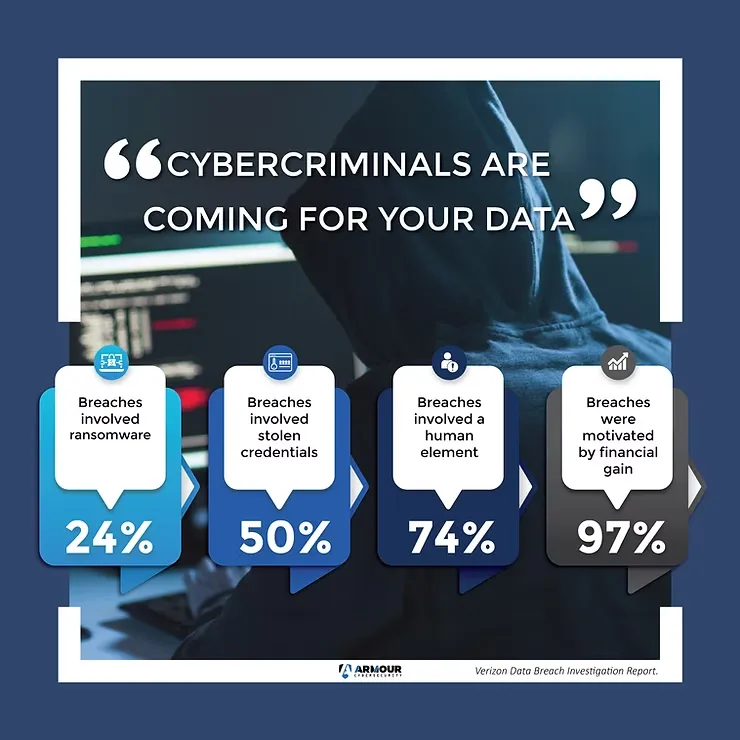
The data backs this up: recent reports show that around 60–68% of breaches involve the human element, mistakes, phishing, or stolen credentials. Phishing and pretexting (fake stories to manipulate people) continue to be top initial attack vectors in major breach datasets.
How Holiday Gift Card & “Secret Santa” Scams Work Now
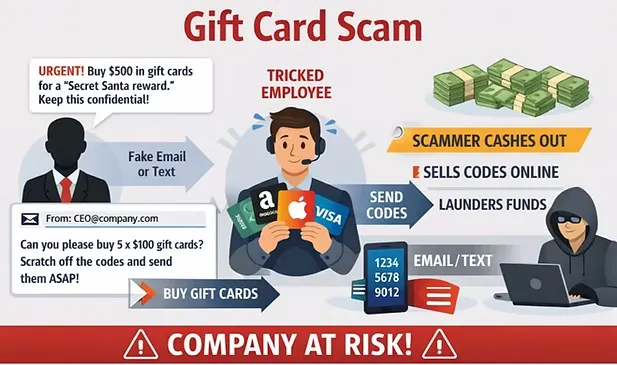
Gift card and prepaid card fraud are still extremely attractive to attackers today because they are fast, hard to trace, and easy to resell. Recent global insights show that gift cards remain one of the top cash-out methods in BEC schemes.
A typical holiday-season scam looks like this:
- Impersonation of authority or HR
- The attacker spoofs or compromises an email, Teams/Slack account, or even SMS thread.
- They pose as the CEO, a senior manager, or HR running a holiday reward or charity initiative.
- Urgency and secrecy
- “I need these gift cards urgently for a client/bonus program.”
- “This is a surprise; don’t tell anyone yet.”
- “I’m in meetings all day, just handle this now.”
- Gift card purchase and code harvesting
- The employee is asked to buy multiple cards (Amazon, Apple, prepaid Visa, etc.).
- They’re told to scratch the cards and send photos or codes via email, text, or chat.
- Once sent, attackers quickly resell or launder the value.
- Holiday twist
- Framed as Secret Santa gifts, year-end bonuses, customer gifts, or charity donations.
- The story matches real internal culture and timing, making it feel plausible.
Attackers are also using polished holiday-themed emails and AI-generated content, making messages look more professional and harder to distinguish from legitimate company communications.
Internal Giveaways, Surveys, and Fake Channels
Beyond gift cards, attackers copy internal comms styles and tools:
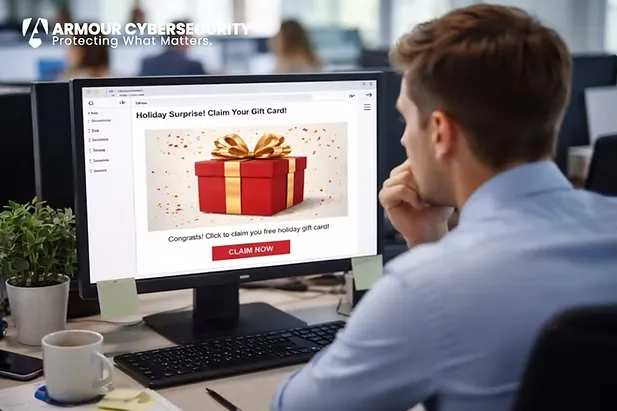
- Fake internal surveys or raffles “Enter our holiday draw by filling out this quick form” → leads to a credential-stealing page.
- Spoofed HR or payroll messages “Update your bank information to receive your year-end bonus” → points to a fake portal.
- Lookalike Teams/Slack/WhatsApp groups “Join the staff Secret Santa channel” → invite link hides malware or phishing pages.
These hybrid social engineering attacks aim to steal credentials, not just cash. Stolen logins are now used in over half of breaches and are among the hardest to detect, often taking many months to identify.
Once attackers control one internal account, every email or chat sent from it looks trustworthy to other employees.
Why People Still Fall for It: Psychology in 2025
Human psychology hasn’t changed, even as attacks become more sophisticated and AI-driven:
- Authority – “The CEO asked. I shouldn’t say no.”
- Urgency – “They need this now; I’ll sort out details later.”
- Goodwill and belonging – “It’s nice they’re doing this for the team; I’ll help.”
- Overconfidence – Many employees believe they can spot phishing, yet admit they would respond if it appeared to come from someone they know.
Younger, highly online staff (Millennials, Gen Z) often feel confident with technology, but surveys in 2025 show they can be more likely to respond to suspicious internal-looking messages without verification.
How a “Personal” Mistake Becomes an Organizational Incident
It’s tempting to view a single click or gift card purchase as a small, personal mistake. In reality, that action can trigger a full-scale incident with lasting impact.
1. Account takeover → internal phishing
If the same scam or a related one captures credentials or session tokens:
- Attackers log in as the employee and begin sending more targeted emails or messages to finance, HR, or leadership.
- These internal emails are far more likely to be trusted and acted upon.
2. Data access and regulatory exposure
Once inside:
- Attackers search mailboxes and shared drives for sensitive keywords (payroll, contracts, customer data, passwords).
- They may exfiltrate personal data, financial data, and confidential documents.
This can trigger:
- Regulatory reporting obligations
- Notification costs and legal fees
- Contractual issues with clients who expect strong security
3. Financial fraud and BEC
Compromised accounts are often used to:
- Change supplier or payroll bank details
- Send “urgent payment” requests to finance
- Approve fake invoices or wire transfers
BEC losses remain in the billions globally, and CEO fraud — impersonating senior leaders to push payments or data transfers — is a dominant pattern in 2025.
4. Reputational and personal impact
- Customers and partners who receive fraudulent emails may lose trust in your brand.
- Employees who were tricked often experience guilt and stress, even though the root cause is usually insufficient training and controls.
So while the initial action (clicking, buying a gift card, entering a password) feels personal, the impact is organizational.
What Organizations Should Do Before and During the Holidays
1. Set clear, written rules around money, gift cards, and changes
- Executives and managers must never request gift cards, payments, or bank changes solely via email, SMS, or chat.
- Require dual approval for gift card purchases and for any changes to supplier or payroll banking details.
- Communicate a simple rule to staff:
If a request is urgent, secret, and about money or credentials, verify it via another channel.
2. Run realistic, focused security awareness training
- Include internal-style scams (fake HR, fake CEO, fake Teams channels), not just generic external phishing.
- Use current examples of holiday-themed attacks: fake bonuses, charity drives, delivery scams, and gift card requests.
- Emphasize that anyone can be fooled, and that reporting quickly is success, not failure.
3. Make reporting effortless and safe
- Provide a one-click “Report phishing” button in the email client.
- Offer clear ways to report suspicious messages in Teams/Slack or other tools.
- Reinforce:
- Reporting is encouraged even after clicking or opening.
- There is no punishment for honest mistakes reported in good faith.
4. Strengthen technical controls
While people are the primary target, technical measures can limit damage:
- Enforce multi-factor authentication (MFA) for email, remote access, and admin tools.
- Use email security to flag external senders and detect spoofed domains.
- Apply least-privilege access, so one account can’t see or change everything.
- Monitor for unusual activity: unusual locations, mass forwarding rules, or big data exports.
5. Build a supportive culture, not a culture of fear
- Leadership should actively support employees who double-check or challenge unusual requests.
- Treat both simulations and real incidents as opportunities to learn and adjust controls.
- Avoid “naming and shaming” individuals; focus on fixing process and training.
Organizations that move away from blame and toward continuous education see lower click-through rates and faster reporting over time, especially when they combine training with regular, well-designed phishing simulations.
What Individual Employees Can Do (At Work and at Home)
Every person has real influence over organizational security, especially during the holidays when scam volume and sophistication increase.
At work and at home:
- Pause before you act Be extra cautious with messages that are:
- Urgent
- Secret
- About money, gift cards, or login details
- Verify using a different channelCall the person, start a new email to a known address, or message them in an existing, trusted chat — don’t just reply to the suspicious message.
- Check the details carefully
- Is the sender’s address or phone number correct?
- Is the tone or language unusual for that person?
- Are they asking you to bypass normal process?
- Report immediately, even if you clickedQuick reporting lets security teams reset passwords, revoke sessions, and investigate before small issues become major incidents.
Because most people use the same devices and sometimes similar passwords for both personal and work accounts, a compromise at home can lead to risk at work — for example, when a personal email account is taken over and used to reset work-related logins or trick colleagues. Treat your personal accounts, devices, and passwords with the same care you’d expect from your company.
Closing Thoughts
In 2025, holiday-themed scams, gift card fraud, and internal-looking social engineering remain some of the most effective ways attackers get in. The technology has evolved — AI-generated content, deepfake voices, and highly targeted BEC — but the core tactic is the same: exploit trust, urgency, and the human desire to help.
The good news is that a combination of clear policies, realistic training, easy reporting, sensible technical controls, and a supportive culture can dramatically reduce risk.
For both organizations and individuals, the rule of thumb is simple:
Slow down. Verify. Report.One cautious moment can protect an entire company.
Q1: Why are gift card and “Secret Santa” scams so common during the holidays?
A: Because they fit perfectly into normal holiday behaviour:
- Companies often run giveaways, bonuses, and charity drives.
- People are busy, distracted, and in a generous mood.
- Gift cards are easy to buy, quick to send, and hard to trace.
Attackers exploit this by pretending to be a manager, HR, or the CEO asking for “surprise” gift cards, client gifts, or donations.
Practical tip:If a holiday message involves urgency, secrecy, and money (especially gift cards), verify it through another channel before doing anything.
Q2: How can I quickly recognize a potential gift card scam?
A: Watch for these red flags:
- The sender asks you to buy gift cards urgently.
- They want you to send photos or codes by email, SMS, or chat.
- They claim they can’t talk (e.g., “I’m in a meeting, just do it now”).
- It bypasses normal finance or approval processes.
Practical tip:Legitimate requests for gifts or rewards will follow normal procedures. If someone asks you to bend the rules, stop and confirm by phone or in person.
Q3: If the email or message really looks like it’s from my boss, should I still question it?
A: Yes. Attackers can:
- Spoof display names and email addresses.
- Compromise real accounts.
- Copy your internal email style and signatures.
Authority is one of the main levers in social engineering. You are not being “disrespectful” by verifying a request that is unusual, urgent, or about money.
Practical tip:Use a known phone number or an existing chat thread to confirm. Never rely solely on “Reply” to the suspicious message itself.
Q4: Is it really a big deal if I just buy some gift cards and send the codes?
A: Yes, it can be:
- The money is usually unrecoverable once codes are sent.
- It proves to the attacker that your organization is an easy target.
- The same attacker may attempt more serious fraud (wire transfers, payroll changes, vendor payment fraud) next time.
Even if “only a few hundred dollars” were lost, it’s a sign of a bigger weakness in process and awareness.
Practical tip:Treat gift card scams as a security incident, not a minor embarrassment. Report them immediately so the organization can respond and learn.
Q5: How can my personal mistake lead to a full organizational breach?
A: A single action can have a domino effect:
- If you enter your password on a fake page, attackers can log in as you.
- With your account, they can send convincing internal emails to finance, HR, or clients.
- They can search your inbox and shared drives for sensitive information.
What feels like a “small” mistake at your level can become a serious incident at the organizational level.
Practical tip:If you suspect you entered your credentials on a suspicious site, contact IT/security immediately and ask for a password reset and account check.
Q6: What should I do if I already clicked a link or opened an attachment?
A: Act quickly, but do not panic:
- Stop interacting with the email or website.
- Report it immediately to IT/security (or use the phishing report button).
- If you entered any passwords, tell IT and change them as instructed.
- Follow any additional steps IT provides (e.g., device scan, MFA reset).
Reporting after you clicked is still a success. Silence is the real risk.
Practical tip:Do not try to “fix it quietly” on your own. Early, honest reporting gives security teams a chance to contain any damage.
Q7: How can organizations reduce these types of internal social engineering attacks?
A: Focus on four pillars:
- Policy: Clear rules that executives and managers will not request gift cards or payment changes by informal messages alone.
- Process: Dual approval for financial changes and gift card purchases.
- Training: Realistic scenarios, including internal-looking scams, not just generic phishing.
- Culture: No blame for honest mistakes that are reported promptly.
Practical tip:Publish a simple “Do and Don’t” one-pager and pin it on internal channels before the holiday season.
Q8: What are some simple technical measures that help?
A: Some key controls:
- Multi-factor authentication (MFA) for email and remote access.
- Email warnings for external senders or potential spoofing.
- Basic restrictions on who can change payment details or approve large transfers.
- Monitoring for unusual login locations and forwarding rules.
These won’t stop every social engineering attempt, but they reduce the impact when someone does make a mistake.
Practical tip:If your email client allows it, enable “external sender” tags and don’t ignore them—especially when the message claims to be from someone internal.
Q9: How can I protect the organization through my personal behaviour at home?
A: Your personal security affects your workplace because:
- Many people reuse or slightly modify passwords across sites.
- Personal email or social accounts can be used for password resets.
- Home devices are often used for work (especially phones).
If your personal accounts or devices are compromised, attackers may pivot to work-related information.
Practical tip (personal side):
- Use a password manager and unique passwords.
- Enable MFA on all important accounts (email, banking, cloud storage).
- Keep your devices updated and avoid installing untrusted apps or extensions.
Q10: Are internal chats (Teams, Slack, WhatsApp) safer than email?
A: They may feel safer, but they are not immune:
- If one account is compromised, attackers can send messages in real channels.
- Fake or lookalike groups can be created.
- Links and files can still be malicious.
Treat unexpected or unusual requests in chat with the same caution as email.
Practical tip:If a chat message asks you to do something sensitive (pay, buy, share data, install software), verify by a different channel or start a separate conversation with that person.
Q11: What are some “golden rules” I can remember easily?
A: Keep these three in mind:
- If it’s urgent, secret, and about money or credentials, verify it.
- When in doubt, do not click or pay—ask first.
- If you make a mistake, report it immediately.
If everyone follows these rules, the organization’s risk drops significantly, even if attackers keep evolving.